Shala Darpan पर Mission Buniyaad Progress कैसे Track करें?
Shala Darpan पर login करने के बाद कई बार teachers, HM, school staff या monitoring officers को यह समझ नहीं आता कि Mission Buniyaad का data कहाँ मिलेगा। Dashboard पर Student, Staff, Reports, Attendance और School Profile जैसे कई options दिखते हैं, लेकिन Mission Buniyaad या PAL Dashboard section तुरंत नजर नहीं आता। इसी वजह से progress report, school-wise data, usage status और report download करने में confusion हो जाती है।
Mission Buniyaad progress track करने के लिए School/Office Login से portal खोलें, फिर Mission Buniyaad Progress, PAL Dashboard या Learning Progress section में जाएं। वहाँ school, session और class filter select करके baseline status, usage report, learning progress और report status check करें। अगर data blank या गलत दिखे, तो सबसे पहले login role, selected session, student enrollment और assessment entry verify करें।

Important Note: Mission Buniyaad किस चीज़ से जुड़ा है?
Rajasthan में Mission Buniyaad mainly digital learning और Personalized Adaptive Learning (PAL) से जुड़ा program है। Official Mission Buniyaad page के अनुसार यह program 3,200+ government schools और 3,00,000+ girls तक पहुँच चुका है, और इसके dashboard में ICT equipment usage और learning progress track करने की व्यवस्था दी गई है। साथ ही, Shala Darpan NSO student mapping के माध्यम से छात्रों के डेटा को सही तरीके से लिंक कर के उनकी प्रगति को और बेहतर तरीके से मॉनिटर किया जाता है।
कुछ schools में portal पर इसका label “Mission Buniyaad”, “PAL Dashboard”, “FLN Progress”, “Nipun Bharat / Mission Buniyaad” या “Learning Progress” जैसा दिख सकता है। इसलिए menu name थोड़ा अलग हो सकता है।
Mission Buniyaad और Shala Darpan का Connection क्या है?
Shala Darpan Rajasthan school education का main digital database portal है। Official description के अनुसार Shala Darpan एक dynamic database management portal है, जहाँ government schools, offices, students, schools और staff से जुड़ा live data online रखा और update किया जाता है।
Mission Buniyaad Progressजैसे program में यह portal इसलिए important है क्योंकि school-level data, student progress, dashboard reports और monitoring details इसी digital system से track होती हैं।
सीधे शब्दों में:
School में learning activity होती है → data portal/dashboard पर update होता है → HM, Block, District level पर progress देखी जाती है।
इसलिए progress track करना सिर्फ report देखने के लिए नहीं है। यह confirm करने के लिए भी है कि school की मेहनत portal पर सही reflect हो रही है या नहीं।
Login से पहले यह 5 चीज़ें Check करें
Mission Buniyaad dashboard खोलने से पहले यह points confirm कर लें:
सही Login Role Use करें
Mission Buniyaad का dashboard हर login में नहीं दिखता। rajshaladarpan.rajasthan.gov.in
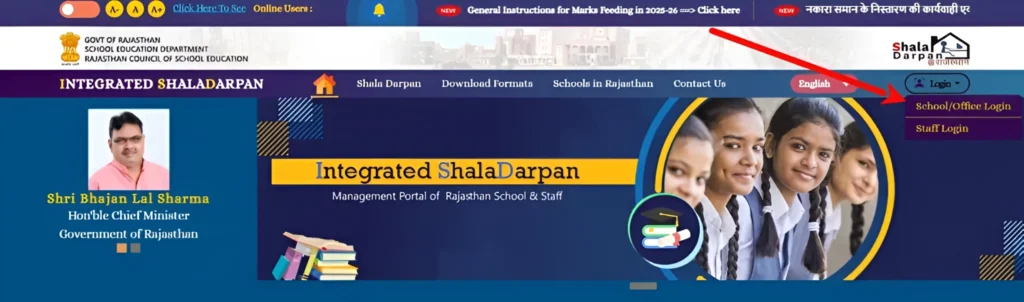
Usually access इन roles में हो सकता है:
अगर Staff Login से option नहीं दिख रहा, तो School NIC-SD ID या authorized login से try करें।
Current Session Select करें
कई बार data इसलिए blank दिखता है क्योंकि session गलत select होता है।
Example:
Always current academic year select करें।
School Mapping / Program Coverage Confirm करें
हर school में Mission Buniyaad का dashboard active हो, यह जरूरी नहीं है।
अगर आपका school program coverage में है, तभी proper data दिखेगा। Official Mission Buniyaad page पर dashboard access के लिए login credentials Shala Darpan account से लेने की बात लिखी है।
Student Data Updated होना चाहिए
अगर students का enrollment, class या section Shala Darpan में updated नहीं है, तो Mission Buniyaad dashboard में progress गलत दिख सकती है।
Check करें:
Internet और Browser ठीक रखें
Mission Buniyaad dashboard में tables, filters और reports हो सकते हैं। Mobile पर यह सही से load नहीं होता।
Best setup:
Shala Darpan पर Mission Buniyaad Dashboard कैसे खोलें?
Portal UI session के हिसाब से थोड़ा change हो सकता है, लेकिन basic path कुछ ऐसा हो सकता है:
School/Office Login → Dashboard → Mission Buniyaad / PAL / Learning Progress / Reports
कुछ dashboards में Mission Buniyaad का separate link Shala Darpan public portal से भी मिलता है। Official Mission Buniyaad page पर dashboard access के लिए “Login” button और Account name, Username, Password डालने का instruction दिया गया है।
Step 1: Shala Darpan Portal Open करें
सबसे पहले official Shala Darpan portal खोलें।
Home page पर आपको School/Office Login और Staff Login जैसे options दिखते हैं। Official Shala Darpan portal Rajasthan Council of School Education के लिए National Informatics Centre, Rajasthan द्वारा developed है।
Step 2: School/Office Login करें
अब login details enter करें:
अगर आप HM या school admin हैं, तो School/Office Login better रहेगा।
Step 3: Mission Buniyaad / PAL Dashboard Option देखें
Login के बाद dashboard में यह options search करें:
कुछ cases में Mission Buniyaad link main dashboard में नहीं, बल्कि external dashboard button के through open होता है।
Step 4: Dashboard Login Details Enter करें
Mission Buniyaad dashboard अलग login screen पर open हो सकता है।
वहाँ यह fields दिख सकती हैं:
Official Mission Buniyaad instruction में भी dashboard login के लिए Account name, Username और Password enter करने की बात लिखी गई है।
Step 5: School / Block / District Filter Select करें
Dashboard open होने के बाद filters set करें:
अगर आप school login से हैं, तो school auto-selected हो सकता है। अगर आप block या district login से हैं, तो school-wise report select करनी पड़ सकती है।
Mission Buniyaad Dashboard में क्या-क्या दिखता है?
Dashboard का design बदल सकता है, लेकिन आम तौर पर आपको यह sections मिल सकते हैं।
दिखता है कि school में कितने students Mission Buniyaad program के under cover हैं।
आप check कर सकते हैं:
अगर enrolled और covered students में बड़ा difference है, तो student mapping या enrollment update check करें।
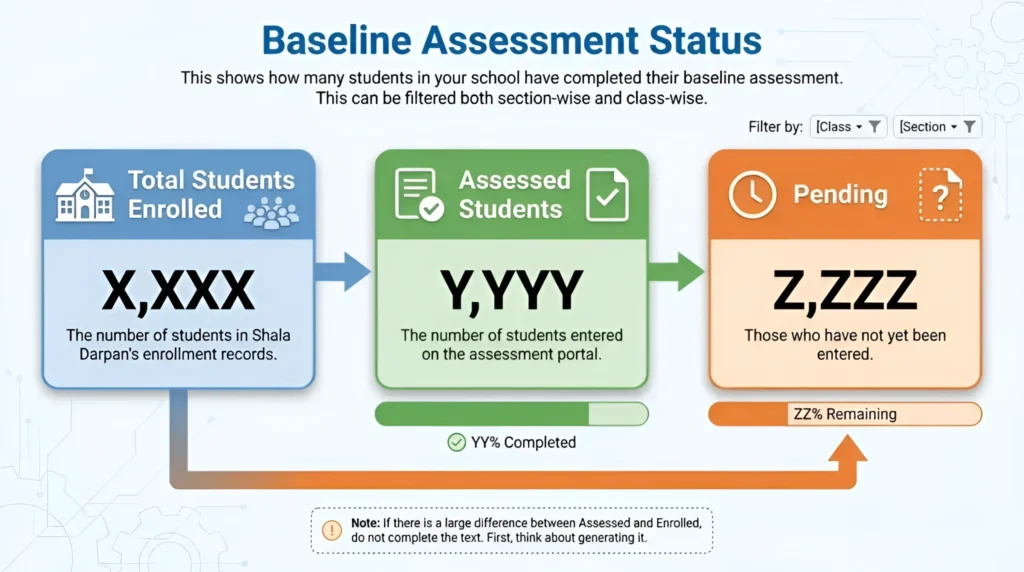
Baseline assessment से पता चलता है कि student शुरुआत में किस level पर था।
यह section दिखा सकता है:
अगर “Pending” ज्यादा है, तो यह signal है कि school में assessment entry या student participation अभी complete नहीं हुआ।
यह Mission Buniyaad dashboard का सबसे important हिस्सा है।
यहाँ आप देख सकते हैं:
Mission Buniyaad का model blended learning और personalized adaptive learning से जुड़ा है, जिसमें digital tools, offline teaching, pre/post testing और personalized content का use होता है।
sage report से पता चलता है कि ICT lab या digital learning resources कितने use हो रहे हैं।
इसमें दिख सकता है:
Official Mission Buniyaad page भी ICT equipment usage और learning progress track करने के लिए dashboard की बात करता है।
wise report में आप individual student की progress देख सकते हैं।
इसमें हो सकता है:
यह section teacher के लिए सबसे useful होता है क्योंकि इससे पता चलता है कि किस student को extra support चाहिए।
Block, DIET या District level access से login कर रहे हैं, तो school-wise report दिख सकती है।
इसमें आप देख सकते हैं:
Monitoring के लिए यह report useful है, लेकिन correction usually school login से ही होती है।
Mission Buniyaad Progress Track करने का सही तरीका
Progress सिर्फ एक बार देखने से काम पूरा नहीं होता। इसे regular basis पर check करना चाहिए।
Weekly Check
हर week यह देखें:
Monthly Check
अगर month-end review में data सही है, तो block/district report में school की progress better दिखाई देगी।
Review Meeting से पहले Check
Review meeting से पहले यह जरूर करें:
Report Download कैसे करें?
Mission Buniyaad dashboard में “Download”, “Export”, “Report”, “PDF” या “Excel” button हो सकता है।
आपको दो common formats मिल सकते हैं:
PDF Report
Excel / CSV Report
Data गलत दिख रहा है तो क्या करें?
यह बहुत common problem है। Portal पर data कुछ और दिखता है, register में कुछ और।
नीचे common cases और solution दिए गए हैं।
Case 1: Student का नाम Dashboard में नहीं दिख रहा
Reason:
Solution:
पहले Shala Darpan student enrollment record check करें। Student active और correct class में होना चाहिए।
Case 2: Baseline Assessment Pending दिख रहा है
Reason:
Solution:
Assessment entry verify करें। अगर entry हो चुकी है, तो dashboard refresh करें या कुछ समय बाद check करें।
Case 3: Progress Zero दिख रही है
Reason:
Solution:
Date range correct करें। Student-wise report खोलें। Last activity date check करें।
Case 4: पूरा School Data Blank दिख रहा है
Reason:
Solution:
School/Office Login से दोबारा login करें। Current session select करें। अगर फिर भी issue रहे, तो helpdesk या concerned office से contact करें।
Case 5: Report Download Blank आ रही है
Reason:
Solution:
Report download करने से पहले filters reset करें और current session manually select करें।
अगर Mission Buniyaad Module नहीं दिख रहा तो क्या करें?
अगर dashboard या module नहीं दिख रहा, तो यह steps follow करें:
Official Mission Buniyaad page पर program/dashboard related questions के लिए help email भी दिया गया है।
Block / District Level Users के लिए Tips
अगर आप observer, CRCC, BRCC, DIET या District level पर हैं, तो आपका काम mainly monitoring होगा।
आप check कर सकते हैं:
लेकिन ध्यान रखें: data correction mostly school login या authorized backend process से होती है। Monitoring login से हर correction possible नहीं होता।
Mission Buniyaad Progress क्यों Important है?
Mission Buniyaad progress track करना इसलिए जरूरी है क्योंकि इससे पता चलता है:
Piramal Foundation USA के अनुसार Mission Buniyaad का target Rajasthan में class 8 to 12 की 10 lakh girl students के लिए digital learning infrastructure, learning outcomes और board results improvement से जुड़ा है।
Frequently Asked Questions
निष्कर्ष:
Shala Darpan पर Mission Buniyaad progress track करना मुश्किल नहीं है, लेकिन इसके लिए सही login, सही dashboard और सही filters का इस्तेमाल जरूरी है। सबसे important बात यह है कि data देखकर सिर्फ report download न करें, बल्कि यह भी verify करें कि school की actual activity portal पर सही तरीके से reflect हो रही है या नहीं। अगर student missing है, progress zero दिख रही है, report blank है या dashboard दिखाई नहीं दे रहा, तो technical issue मानने से पहले session, login role, student enrollment और selected filters को जरूर check करें। Mission Buniyaad dashboard school की digital learning progress को समझने का एक useful tool है, बस उसे सही तरीके से पढ़ना और verify करना आना चाहिए।